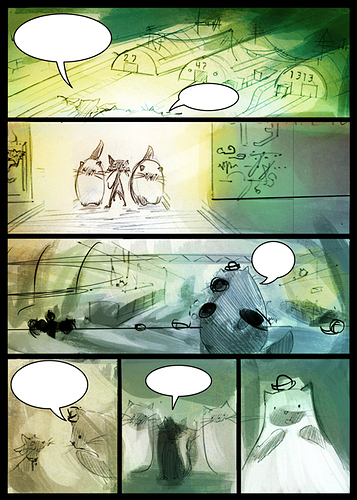
Like other's have mentioned, grayscale bases act as a contrast study--to see if the page still flows based just on black and white alone. Later, you can add color, but since grayscale can make your colors seem gray, sometimes I just leave the grayscale study to the side, Other times I usually smother it in filter layers or add a "gradient map" layer.
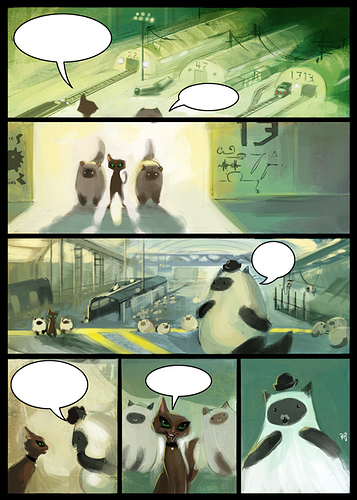
So I actually really hate the typical comic pipeline, although I can do it if I'm bothered enough to do it. It just feels really redundant of a process and takes 5 years and feels like an absolute waste of time. Though if you love it, keep on doing it and power to you, there's nothing wrong with the typical ink process. Since my joy is in painting, I do fully painted pages without lineart at all. So my method looks like this in Photoshop or in Clip Studio (though Clip Studio is better for linework than painting) this is an older comic since my current one is entirely black and white.
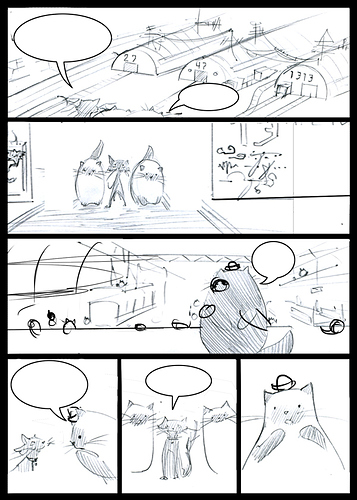
start with an underdrawing--this was eons ago so it's scanned pencil with some digital fixes
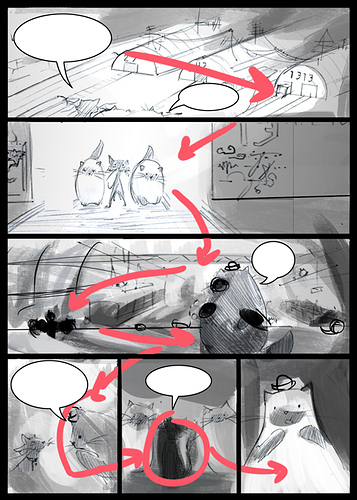
Then I start doing grayscale to make a path where I want the reader's eye to go. Their eye will follow the paths of light and shadow, and any super contrasting areas.
Then I add filter layers to change the grayscale to color. It takes kind of a few filter layers since grayscale just eats up bright colors
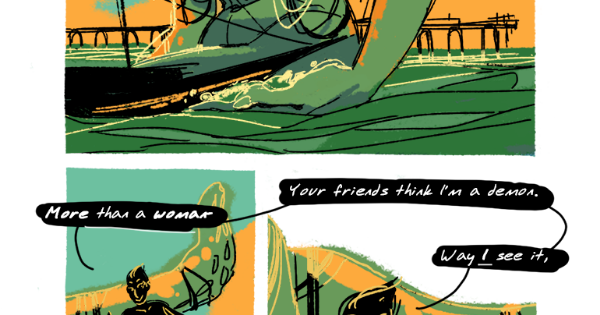
Then, I paint, adding any brighter colors as I need and matching the colors of the character designs to fit within the lighting of the scene. (Excuse the scewy perspective, I figured it would be a fun stylistic twist at the time since every character in this scene is a roly poly cat but indeed just looks like bad perspective, haha. At least I can see how far I've improved since I painted this page.)
But even though my process is mostly different, the grayscale method is just indispensable in both methods for coloring a comic page in how it helps unify a page so you're thinking about the power of the page as a whole and not just frame to frame.