Hi everyone! I've got a question for you guys. I know many of you use Clip Studio Paint to make comics, so I was hoping someone could help me with this issue.
I recently downloaded a bunch of comic fonts through Adobe Fonts. One of these is Comicraft's "Meanwhile". At first I thought the fonts I got would only work in Photoshop and other Adobe-related products, but apparently I can get it to work in other softwares too, like Microsoft Word and Clip Studio Paint. However... I'm encountering a little issue.
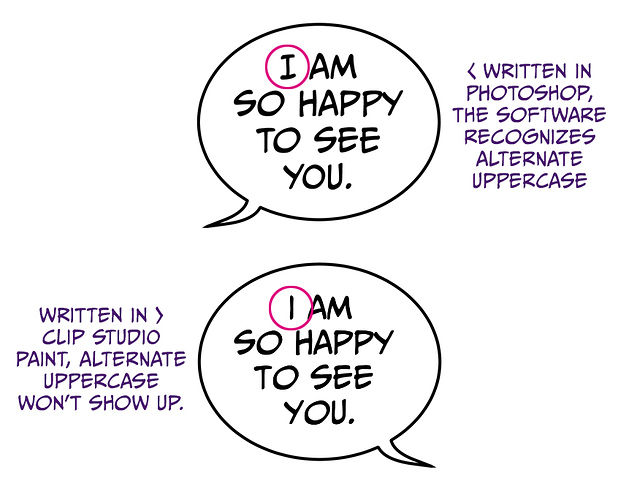
See, the font comes with alternate uppercase letters. In Photoshop, it seems to automatically recognize when there's a single, uppercase "I" and it changes the letter accordingly to make it look different from the regular "i". In Clip Studio, however, the alternate uppercase thingy doesn't seem to work. Here's an example of what I mean:
As you can see, the first "I" looks different in Photoshop and CSP. Edit - forgot to add: nope, capitalizing/using caps lock in CSP wont' work either.
Sooo... is there any way I can get the alternate uppercase I to show up in CSP just as it does in Photoshop? Does anybody else have the same issue? I'm especially interested in knowing if people who bought the font from Comicraft itself are experiencing the same issue, 'cos I thought the problem could be with Adobe Fonts rather than with CSP.
Not sure if that helps in any way, but I'm on a Windows 10 and the software versions I'm currently using are Adobe Photoshop 2020 and Clip Studio Paint EX 1.10.6.