I've made TONS of covers on Canva so I know your pain!
Your cover isn't bad for a newbie attempt. Your artistic vision is clear with what you made. My biggest advice is to practice. Make multiple versions of a cover if you need to. With practice, you'll get a better idea of what works for the project and what does. And getting feedback when you need it works too!
Tips to Remember/Questions to Ask Yourself:
- It's okay to use a template. If the art fits what you're going for, edit it to make it your own. It's totally okay.
- What is your story about? How can you best visually describe the story without giving away spoilers?
- Pick a color palette and stay with it.
- Your fonts ALL need to be legible. *Bonus points if the fonts complement each other.
- Start at the back of your image and work forward. Using your cover for example, it's easier to start off with a clear sky background and add stars and clouds or a starry background and add clouds than try to add stars over the clouds and title. (Canva lets you rearrange layers that helps with this.)
- Less can be more. If you can't figure out how to do a complicated cover image, don't. Simplicity can be your best friend.
- If you plan on doing multiple covers/images for your series - make a logo for your font. It will save you EONS of time in the long run.
- If you are making the art for you, make sure you like what you make first and foremost.
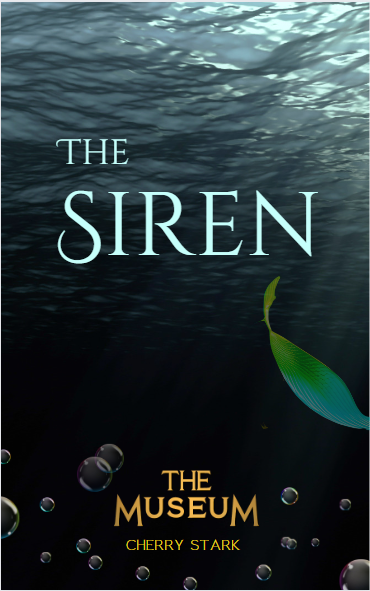
Here is a cover that I just recently did. I didn't want something wild and crazy, so I went with a simple water background. The title font clearly legible and I picked a color that fit in with the general theme of a mermaid story. I darkened the mermaid tale to give it some depth and to blend into the background better. Since the story is part of a series, I added the logo I made to the bottom to tie it in with the rest of the series.


