all good! you can cut up comics and stack the panels, but there are numerous reasons an artist might choose to lay them side-by-side. I guess the question you have to ask yourself as an artist, is how would you best like to format your comic. as for filesize, tapas lets you upload multiple images, so most verticle-scroll comic artists will export several images and upload them in the proper order onto tapas(i don't have to do this with my page-format cause it's just one short image). these are just good examples of how other people layout their panels horizontally, since traditional page-format more often relies on this its not a bad way to study that particular technique.
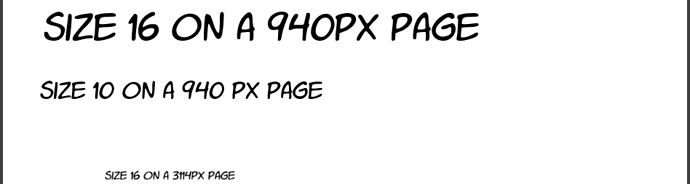
with fonts, the size 16 font I use takes into account the shrinkage, if i were working with a 940px canvas for example, size 16 would appear larger than on a 1334 page because there are less pixels across. the difference would look something like this:
I think most fonts are vector automatically but if you export the larger canvas to a smaller image everything gets rasterized down proportionally, so yeah, my size 16 is getting shrunk but a lot of artists like to work on a bigger canvas for image quality sake. Kind of a brute force answer but keep doing testing on your phone to see how big a font you are comfortable using with the size canvas you are normally working on.
If your text is shrinking to be too small it may be a matter of the program you are drawing in(i am using clip studio paint on a desktop), meaning you will need to still increase your size and find the number that works in your device and program. It could also be a difference in fonts, since some fonts are naturally just smaller than others. Don't know what kind of font you are using but things like style of font could also be contributing, which is why simple sans-serif, comic-style fonts are most popular but any style could theoretically be manageable with the right sizing. I would make things easily read on mobile, cause it sure doesn't hurt to have big font on a larger screen but small text on a small screen kinda sucks aahaha!
as for the shrunken image size: i believe 940px is meant to be viewed on desktop so it looks
alright, I assume that tapas/webtoon are both resizing the images on mobile. i'll often notice the quality of my webtoon uploads will look real crunchy when I'm on my mobile reader on my ipad with a bigger screen. It's one of my major complaints with the service.
A bit of a rambly answer, but I hope it can be of some use. And don't worry about being confused, it takes a bit to get into the swing of things and find the process you work best with, with practice these things become routine. keep at it and don't sweat it, especially in the beginning!