Here are screenshots for resizing images on the computer for Windows, if that helps. It could be similar for other operating systems (Apple IOS) or devices (tablets), but I would not know. 
Reference for default Windows Photos (as of Jan 17 2026 anyways) on computer
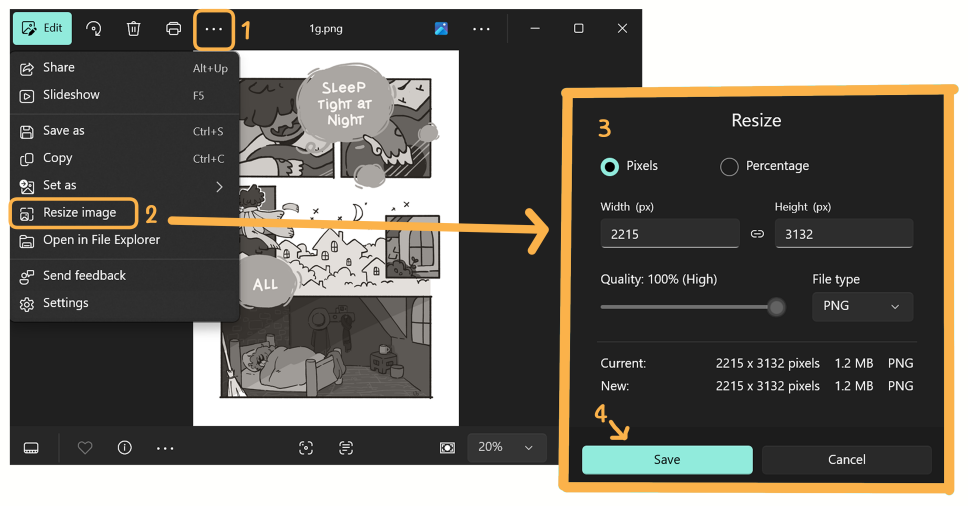
(1) Click on the 3-dots button. It will pull down an additional menu.
(2) Select Resize image. This pops out a window.
(3) Adjust settings in pop-up window. Resize > by pixels, width = 940 px, Quality: 100% High, File type: PNG or other
(4) Save image. This should ask you where to save image -- file location and name. Remember to rename file under different/new image so it does not save over your full-size copy.
Reference for MS Paint (the old one) in computer.
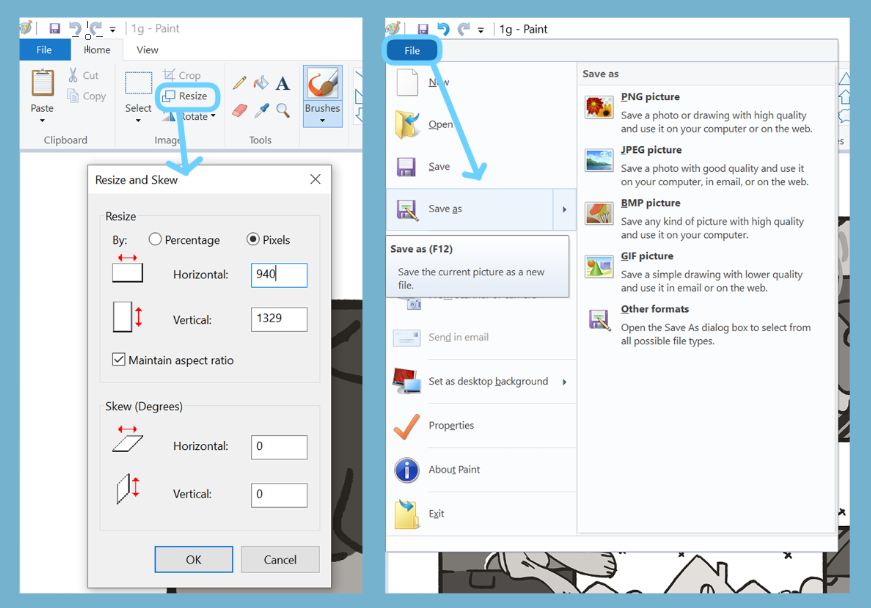
(1) Open picture in Paint
(2) Resize by pixels
(3) Save as new picture file
Other Notes -- Most digital drawing programs should be able to resize picture/change resolution. However, if you are drawing digitally with layers, I would recommend saving as a flat picture (final) and resizing the final picture without layers. It's easier for the program to resize one layer rather than multiple.


