I think the issue is that you are using the fill tool to color in the same layer as the inks. This creates ARTIFACTS because the black blends to the white with a series of gray tones that are hard to see to the naked eye.

What most comic colorists do (in the american industry, at least), is this:
1) have a layer with just the inks
2) put a layer underneath with the colors
3) put various layers as needed for special effects.
BUT you may say: does that mean i need to fill in each layer by hand? Not necessarily- there are a few tricks for this. First, there are apps like BPelt which flatten/multifill a layer (basically, it takes this:

and turns it into this:

Then you can overlay a layer of black inks on top of it, and VOILA: no 'artifacts' of gray that are in your coloring.

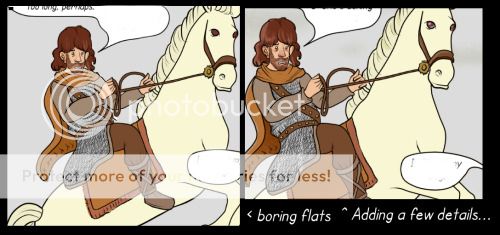
You can use the paint bucket with ease, and pick your colors, then add extra areas the tool missed (cause they weren't a solid section of space with no gaps). Then add shading, flourishes, etc:

Second, you can use the SELECTOR tool combined with the EXPAND tool (with 2-3 pixels set) to grab a section of an image, and paint underneath it without having those artifacts, cause you are painting SLIGHTLY OVERLAPPING the black areas.
If neither of these help, look around online for How To Get Rid of Artifacts Coloring Comics and you should see some better tutorials.
Good luck!