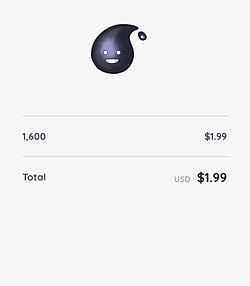
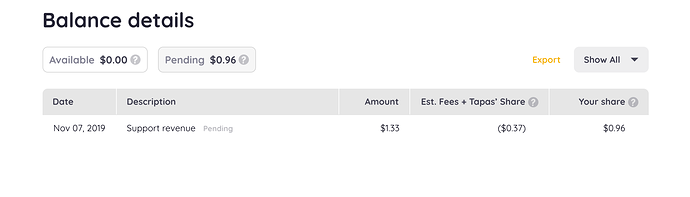
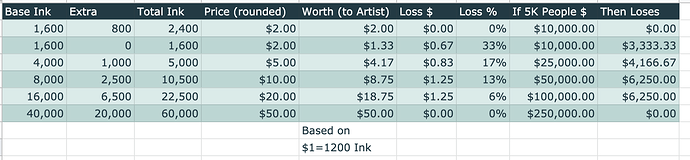
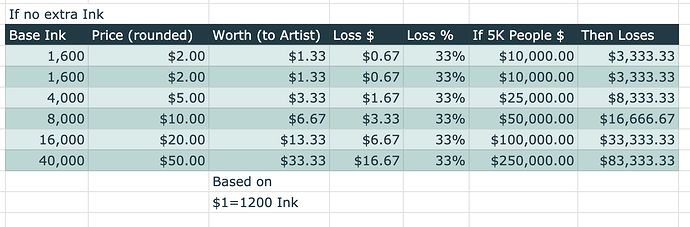
The Amount column is either a dollar conversion of the Ink used for Support OR the dollar amount accrued from Ad Revenue.
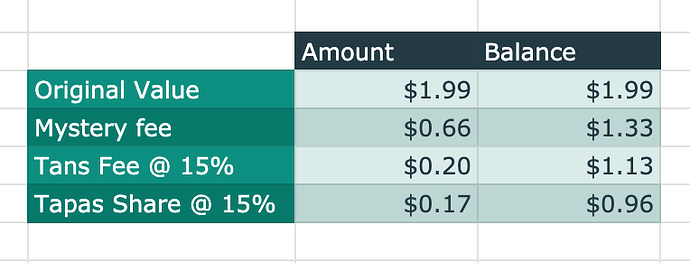
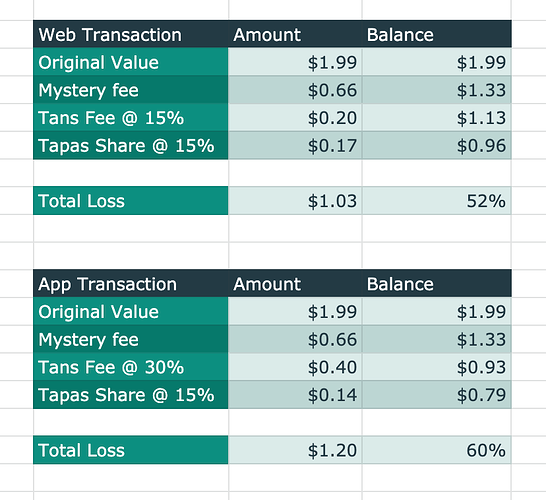
So, each individual Ink is meta-tagged with a source and origin. The sources being iOS, Android, Web, or Earned (i.e. generated from watching ads, installing partner games, or participating in surveys). The origin meta-tag is based on whether the Ink has been purchased, each Ink Pack consists of its own individual Ink values (different values and price points will occur depending on your country of origin - different fees also apply based on those individual country's laws regarding how in-app purchases work). When Ink is used for Support or for the purchasing of premium episodes our system checks for each individual Ink's source and origin, and depending on it's source and origin, a fee is incurred - for iOS and Android a 30% fee occurs, for web a 15% fee occurs.
There can be instances where the total Ink used can come from multiple sources and origins which will impact the "Est. Fees + Tapas' Share" column, so for Support, it won't always display a consistent 30% (app) + 15% (tapas) fee, 15% (web) + 15% (app), and/or 0% (Earned)+ 15% (tapas) fee.
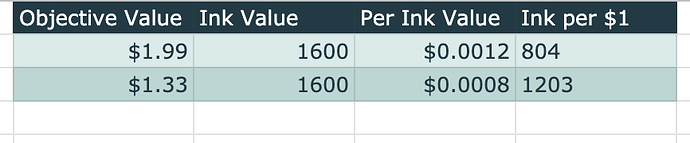
Hopefully that clarifies how the Amount column is calculated and how the fees' column operates, as well as sheds some more clarify on how each individual Ink is valued.